
 Download the App
Best Free Crochet App for Beginners: What to Look For
15 Sep, 2026
The best free crochet app for beginners isn't the one with the biggest pattern library or the flashiest tutorials, it's the one that turns confusing shorthand into plain instructions and keeps track of your rows automatically. Yarnzy does both, on iPhone, Android, and Mac.
You finally sit down with a pattern you're excited about, hook ready, yarn ready, evening free. Then you read the first line: "Ch 16, sc in 2nd ch from hook, dc in next, sk 2, ch2sp, sl st to join." Nothing about that sentence makes sense yet, so you close the tab and tell yourself you'll come back to it later.
That moment isn't a sign you're bad at crochet. It's a sign the pattern was written for someone who already speaks its language,and most beginners don't yet.
Ready to Read Your Next Pattern the Easy Way?
 Download Yarnzy
Why Crochet Patterns Are So Hard to Read at First
Crochet patterns are hard to read for beginners because they're written in compact shorthand, not full sentences, so the meaning isn't obvious until you already know the code.
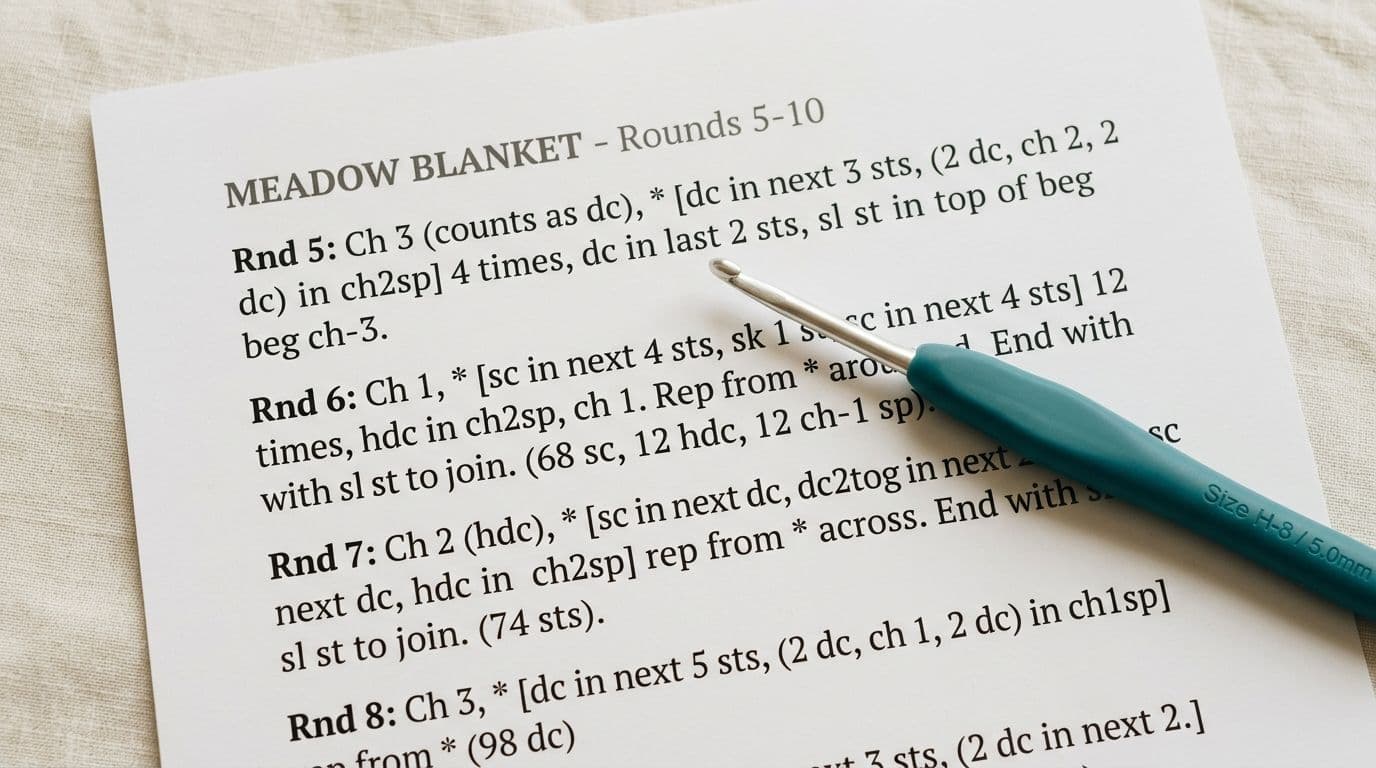
There's a second layer to this too: US and UK terminology don't match. A "double crochet" means something different depending on which convention the pattern uses, and a beginner has no way of knowing which one they're looking at unless the pattern says so. Get it wrong, and you can crochet an entirely different stitch than the pattern intended, without realizing it until much later.
Why Abbreviations Trip Up Beginners the Most
Terms like sc, dc, ch, hdc, sl st, or combinations like sc2tog and ch2sp almost never come with an explanation attached. Most patterns assume you already know them. The usual workaround, opening a separate tab to look each one up, breaks your concentration and often costs you your place in the row you were counting.

Come Across a Stitch You Don't Recognize? Look it up in Yarnzy's stitch dictionary, clear photos and plain-English instructions for every stitch, so you're never stuck guessing what a term means.
Why a Big Pattern Library Isn't the Feature That Matters
A library of thousands of free patterns sounds like a big selling point, until you realize it doesn't help if you can't read a single one of them yet. For a beginner, that's a library card without the ability to read. What actually helps is an app that walks you through one pattern, step by step, until you can follow it on your own.
What to Actually Look For in a Beginner Crochet App
Once you know what the real obstacle is, evaluating apps gets much simpler. Catalog size, design polish, and community features are all secondary. What matters is whether the app can take you from "I don't understand this pattern" to "I'm working through it, row by row."
Pattern Explanation vs. Pattern Storage
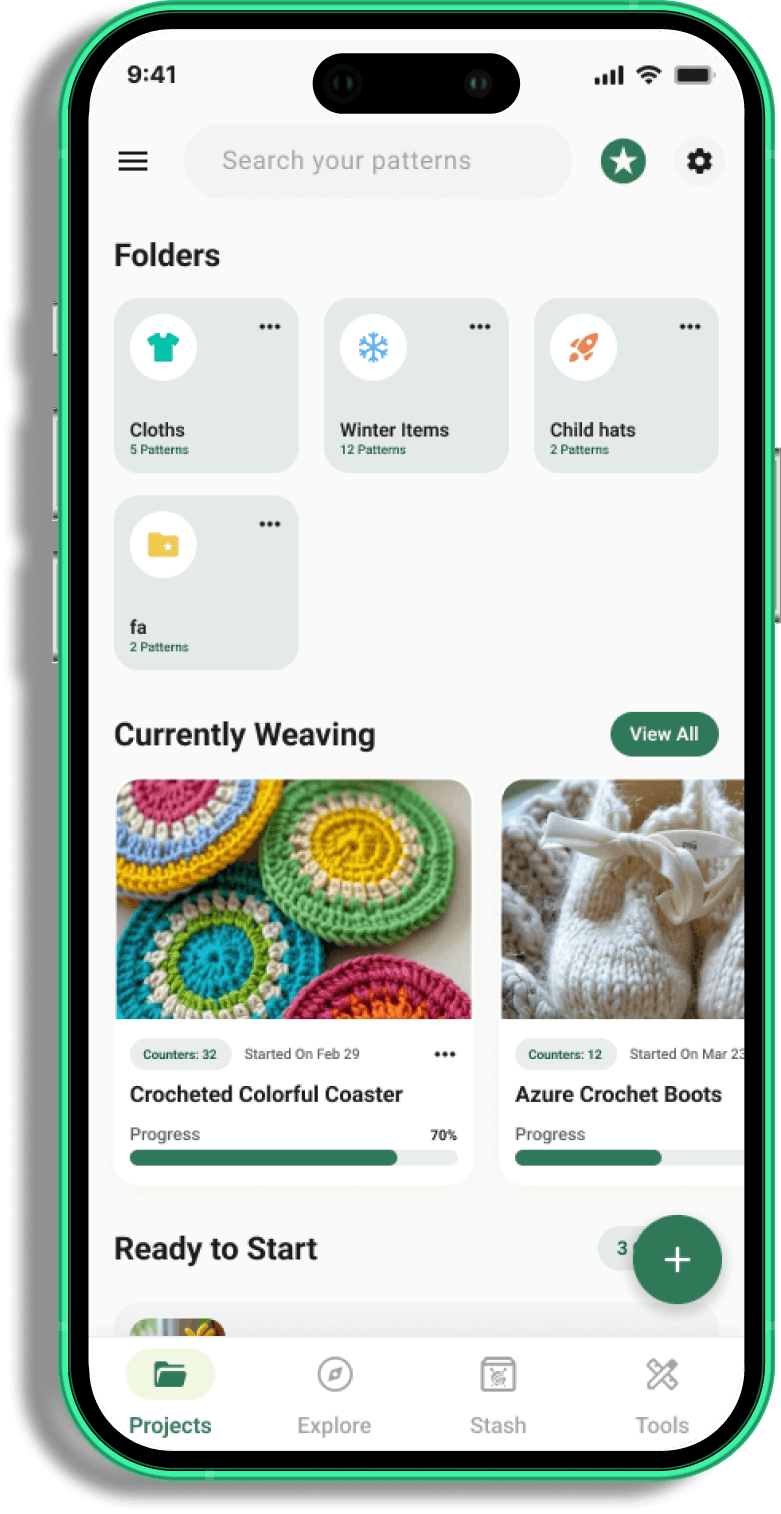
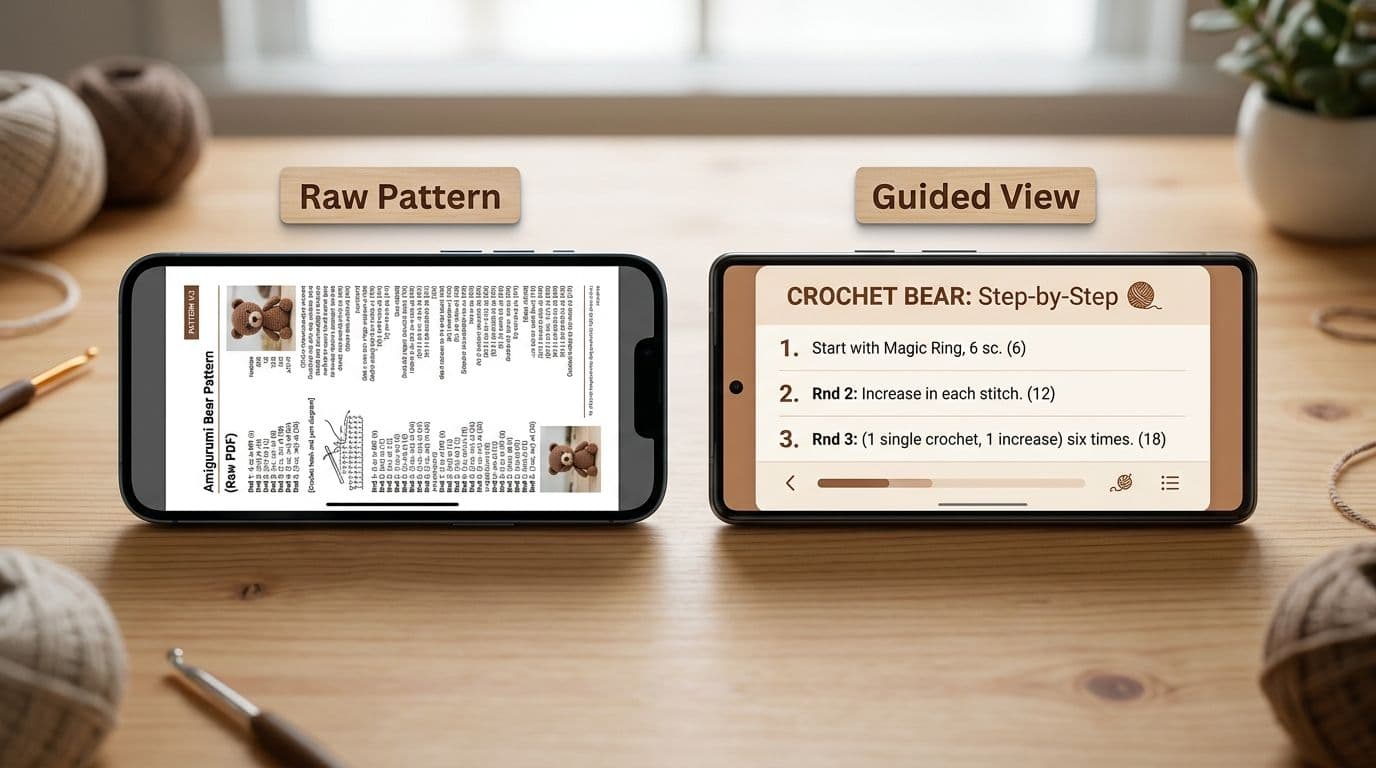
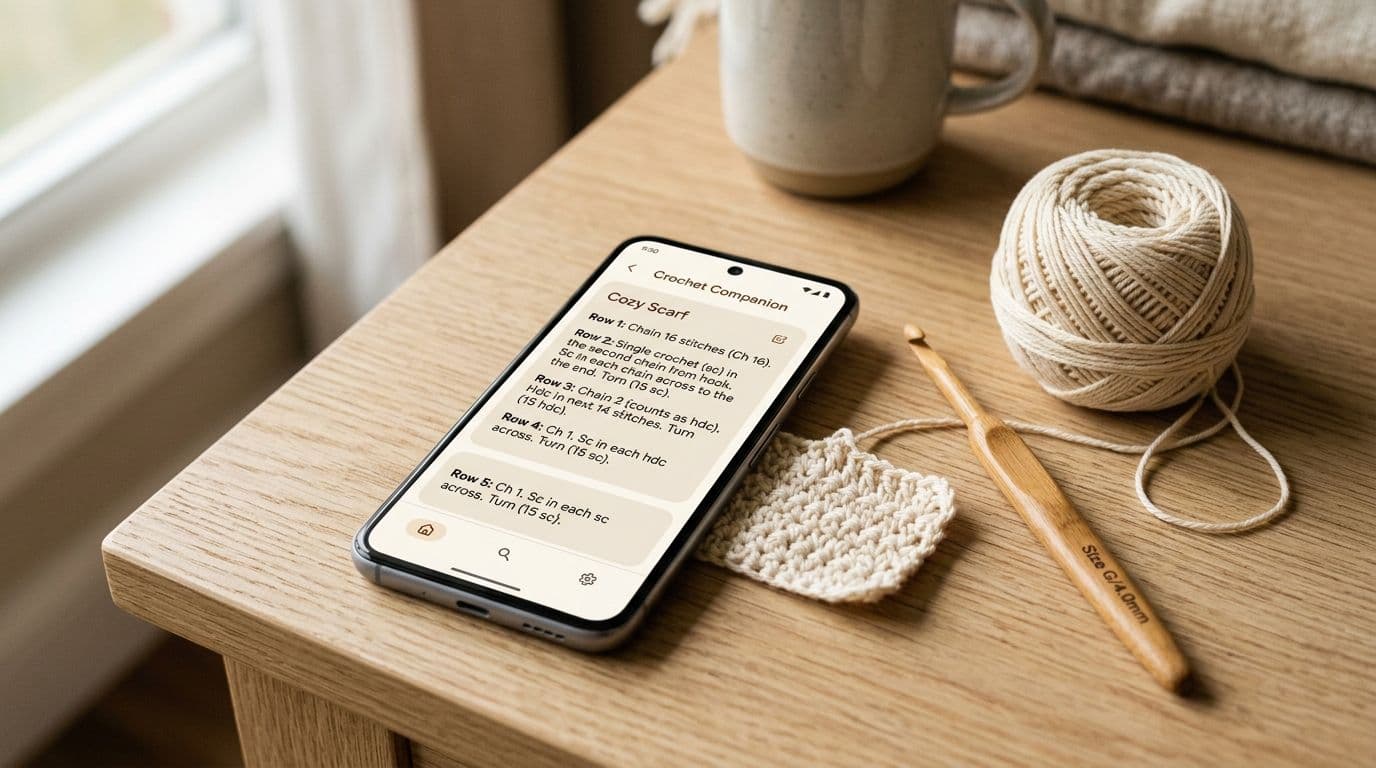
Some apps just display your PDF pattern cleanly and let you zoom in, that's storage. A different kind of app reads that same pattern and rewrites it as a plain instruction you follow one step at a time, like "Chain 16. Single crochet in the second chain from your hook." That's the explanation, and it's the feature that actually moves a beginner forward, because you're no longer holding the pattern, a glossary, and your own work in your head all at once.
What Good Abbreviation Decoding Should Actually Look Like
A useful abbreviation tool isn't a scrollable list of 80 terms, it's a direct, one-tap answer to the exact term in front of you, without leaving the pattern you're working on. That frictionless access is the difference between a feature that gets used and one that technically exists but never helps anyone.
Why Row Tracking Matters More Than Beginners Expect
A manual tap counter works like a clicker, simple, but one missed or double tap silently throws off your whole count, sometimes for rows before you notice. Automatic tracking tied to guided instructions doesn't have that failure point: the app knows exactly which step you're on because it's the one walking you through it, so your count updates as you work, not as you remember to press a button.

Not Sure How Wide or Tall Your Project Will Turn Out? Enter your gauge and target size, and get the exact stitch and row count you need no guessing, no frogging halfway through.
Yarnzy: Built Around Finishing Your First Project
Yarnzy was built on one idea: understanding a pattern comes before collecting patterns. The features that help you actually follow along are the core of the app, not something added on top of a browsing experience.
How the AI Pattern Reader Works
When you import a pattern, Yarnzy reads its structure and turns it into a guided instruction flow, one row or round at a time, in plain language, instead of raw shorthand. Hit a term you don't know, and the explanation appears right there, without pulling you out of the step you're on. In practice, this means you don't need to know what "ch2sp" means before you start; the app handles that translation as you go. As with any AI tool, it's worth double-checking a converted step against your original pattern for anything unusually complex.
What's Actually Free
Yarnzy's core tools, the AI pattern reader, guided instructions, automatic row and stitch counter, inline abbreviation explanations, and a multi-project workspace, are free to use. That matters because many apps put exactly these features behind a paywall: row counters capped after a couple of projects, glossaries reserved for paid users, PDF import limited to one or two patterns on a free plan.
What to Watch For With Other Free Crochet Apps
There are a few other names that come up often when people search for beginner crochet apps, and each one is genuinely good at one specific thing.
• Crochet Genius leans heavily on video tutorials, solid if you want to watch a stitch demonstrated step by step, but it isn't built to read a pattern you bring in from somewhere else.
• Pocket Crochet keeps things minimal: a simple, offline row tracker with manual PDF markup. It's fine for a quick tally, but it won't explain a single abbreviation for you.
• My Row Counter stands out for voice-activated counting, which is handy when your hands are busy though like Pocket Crochet, it only tracks, it doesn't translate.
• Ribblr offers a nicely formatted, interactive pattern experience, but only for patterns sourced through its own marketplace, bring in your own PDF, and that formatting doesn't carry over.
• Text-based, step-by-step apps (like Yarnzy) suit makers who want to move at their own pace, re-read a specific instruction without hunting through a timeline, and work in short sessions without losing their place.
Getting Started With Your First Project
Pick a simple first pattern, a dishcloth, a granny square, a flat rectangle scarf. These use a small set of stitches repeatedly, so you naturally learn the most common abbreviations by the time you finish. Save or screenshot a free pattern and import it into Yarnzy; the AI reader converts it into your guided view, showing your current step, row, and stitch count in one place.

From there, follow the first instruction, complete it, and tap through to the next. When you hit something unfamiliar, tap it for the plain-language explanation and keep going. Getting confused mid-pattern is completely normal, at every skill level, the difference a good app makes is that confusion becomes a short pause instead of a reason to put the project in a bag and forget about it.
The Bottom Line
The best free crochet app for beginners isn't the one with the biggest library or the most polished design. It's the one that teaches you to actually follow a pattern, decodes the terms you don't know yet, and remembers exactly where you left off. Yarnzy's AI pattern reader, inline abbreviation decoding, and automatic row tracking are free on iPhone, Android, and Mac, no subscription required for the tools that matter most when you're just starting out.
Frequently Asked Questions
Yes, this is exactly what Yarnzy's AI reader does. It takes a PDF, image, screenshot, or typed pattern and turns it into a guided, plain-English instruction flow you follow one step at a time.
Share this page
 X / Twitter
 Facebook
 Reddit
Related articles
Bernat Yarn Substitutes: What to Use Instead of Blanket, Maker, Pipsqueak & Bundle Up

How to Crochet a Pumpkin: Free Patterns for Fall & Halloween Decor
How to Read Crochet Patterns: A Beginner's Guide

Yarnzy: #1 Crochet & Knitting App
Track knitting and crochet projects with a timer & row counter, Import Patterns from Anywhere, Manage Stash & more all in one place.


Free to start · iOS, Android & Web
Scan to Download the App
Start your next project with confidence